Ever wonder why one hour on Zoom feels more exhausting than a whole day on campus? You aren’t alone. Zoom fatigue is a factual psychological reaction to overindulgence with video conferencing. It drains your mental battery and kills your motivation. In the case of students, it generally causes complete virtual burnout and poor grades. This occurs due to the fact that our brains have to work significantly more to decode digital cues via a computer. Fortunately, all you need is to regain your concentration with just a few modifications. This guide explains exactly why you feel drained and how to manage Zoom fatigue.

Key Takeaways on Managing Zoom Fatigue
- Zoom fatigue is a combination of physical and mental fatigue caused by video calls.
- The “mirror effect” and constant eye contact are primary psychological stressors.
- Overall, burnout symptoms are persistent brain fog and chronic procrastination.
- Simple steps, such as the 20-20-20 rule, can help greatly to minimize digital eye strain.
- Seeking academic help is a valid solution when stress impacts your physical health.
A Quick Overview of Zoom Fatigue
| About Zoom Fatigue | A collection of physical and psychological responses resulting from extended periods of time on video conferencing platforms. |
| Causes |
|
| Common Symptoms |
|
| How to Manage |
|
| When to Seek Professional Take My Online Class Help |
|
What Exactly is Zoom Fatigue and Why Does it Happen?
Zoom fatigue is also known as video conferencing exhaustion. It is defined as “a collection of physical and psychological responses.
This is normally a result of spending long periods of time in Zoom or any other videoconferencing platform. This mostly leads to feelings of anxiety, exhaustion, or burnout (Source: National Institutes of Health / National Cancer Registrars Association, 2021).
This condition is a primary driver of virtual learning burnout. The following are 5 reasons why this occurs:
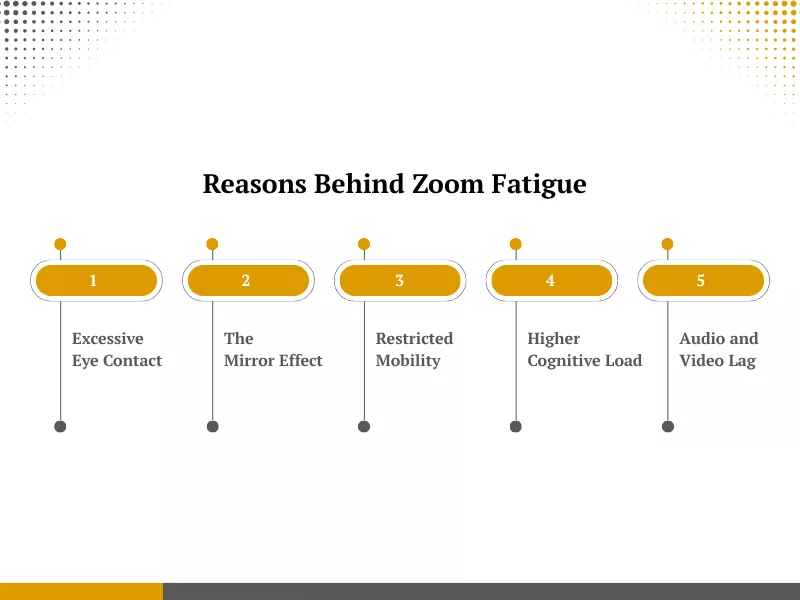
1. Excessive Eye Contact
During a real-life meeting, individuals will look at the speaker or take notes. During video calls, all people are looking at each other all the time. This high-pressure environment leads to challenges of online classes and results in digital eye strain.
2. The Mirror Effect
The majority of platforms present a real-time video of your personal face. The constant gaze at yourself is psychologically exhausting, and it causes a person to be extremely critical of their appearance. It is like someone following you around with a mirror all day.
3. Restricted Mobility
Video calls also entail your sitting at a certain position to fit within the camera frame. You are not able to move around or stretch like you would during a phone call. This lack of natural movement heightens remote learning stress.
4. Higher Cognitive Load
It will require a lot more effort to transmit and communicate non-verbal communication through the Internet. You need to overdo facial expressions to indicate that you are listening. The small tile also makes it hard to read the subtle body language of others.
5. Audio and Video Lag
Small delays in transmission disturb the natural flow of conversation. Our brains perceive these tiny gaps as social rejection or a lack of interest. This “technical dissonance” makes users feel anxious and out of sync with their team.
What Are the Common Symptoms of Virtual Burnout in Students?
| Types of Zoom Fatigue | Key Characteristic | Description |
| Social Fatigue | Interpersonal burnout | Feeling drained by the need to maintain social presence on camera. |
| Emotional Fatigue | Internal exhaustion | Numb, anxious, or bored during the video session. |
| Physical Fatigue | Bodily strain | The eye strain, neck pains, and headaches are due to sitting in a fixed position. |
| Cognitive Fatigue | Mental overload | Inability to process audio and video messages at the same time. |
| Visual Fatigue | Eye stress | Fatigue due to the eye-strain of looking at pixels and the high levels of screen brightness. |
Identifying early signs can help students better manage Zoom fatigue and protect their academic performance.
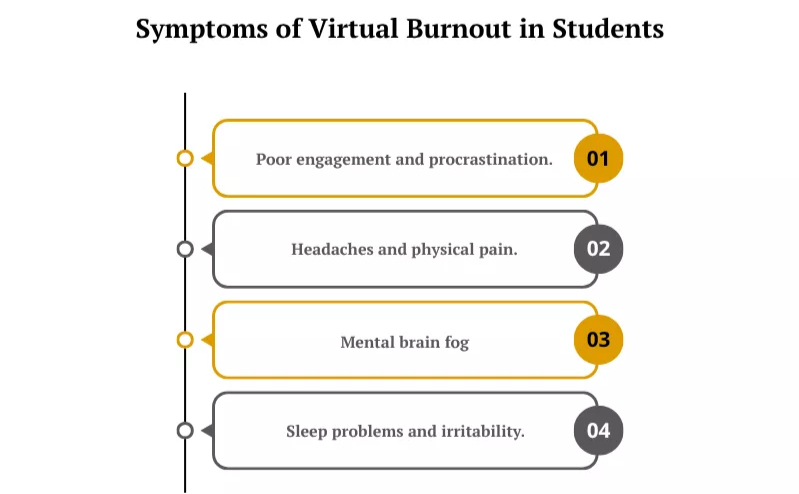
1. Chronic Procrastination
Students with burnout usually do not want to log into portals or to start assignments. This is because the idea of watching a screen is too much to bear. They can delay the simplest of tasks until the very last moment.
2. Diminished Online Classroom Engagement
Burnout causes the inability to engage in discussions and group work. Students often keep their cameras off and remain on mute to “hide” from the class. This loss of online classroom engagement makes learning feel passive and unrewarding.
3. Increased Irritability
One of the key symptoms is frustration when looking at little technical bugs or critiques on minor assignments. Emotional exhaustion reduces a student’s patience. This usually results in resentment towards teachers or other students.
4. Declining Physical Well-being
The typical physical symptoms are frequent headaches, tension in the back, and stomach problems. These physical ailments are major factors affecting student mental health US trends today. The body reacts to digital stress with actual physical pain.
5. Persistent Brain Fog
Students can struggle with focusing and recalling what was covered during a lecture. Brain fog can cause difficulty processing information or performing complex tasks. Even just a few minutes of onscreen time leave the mind feeling cloudy.
6. Disturbed Sleep Patterns
High exposure to blue light and constant digital stress can ruin a student’s sleep cycle. They can experience difficulties in falling asleep, or they wake up feeling not refreshed. Poor sleep then creates a cycle of further exhaustion the next day.
How to Manage Zoom Fatigue? An Online Students’ Guide
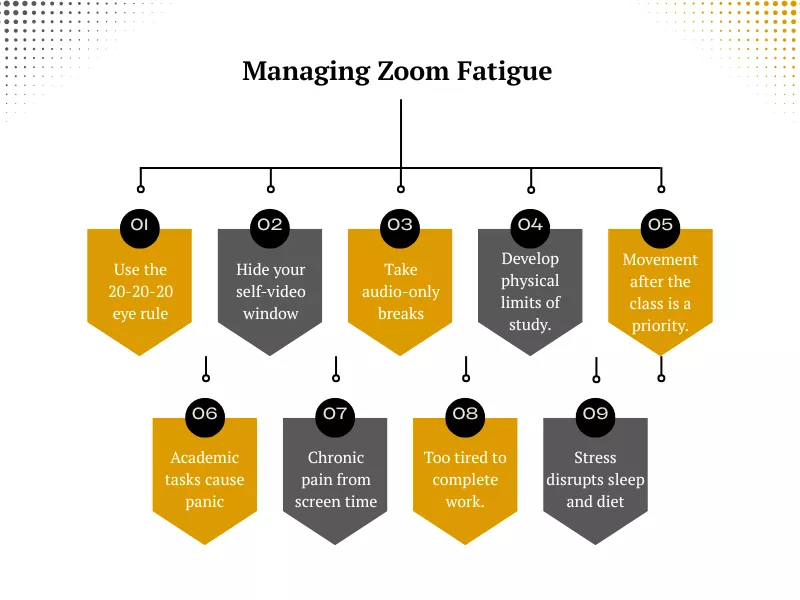
Applying these tips to become a successful online student can help you maintain your well-being while excelling in your courses.
1. Adopt the 20-20-20 Rule
To take a rest for your eyes, every 20 minutes, look 20 feet away, and hold your eyes for 20 seconds. This is a critical habit when managing screen time for college students. The practice aids in relaxing the eyes and is a significant component of vision care.
How can I reduce eye strain during long online classes?
- Increase text clarity by using a high-resolution monitor.
- You can set the brightness of your screen to fit the brightness of the room you are in.
- Keep your screen at least 20 inches away.
2. Hide the Self-View Window
The image of yourself in the course of a call is distracting and depleting. The vast majority of platforms give you the option to conceal your own video feed on your screen, but still be seen by others. This small change lowers self-consciousness and preserves mental energy throughout the session.
3. Take Audio-Only Breaks
Not all interactions need a camera, and taking the stress off of being on can be a great help.
You might wonder, is it okay to turn my camera off during a lecture? Generally, it is ok to switch off your camera based on the particular situation of the class and the professor’s rules.
When you decide to do so, remember the following to ensure:
- Before attending, always first consult the particular syllabus or attendance policy of your professor.
- Request camera-free time when making long and non-interactive presentations.
- Get help on any technical or fatigue-related problems from your instructor in private through email.
4. Create Physical Boundaries
Create a certain space in your house that is dedicated to schoolwork. This physical separation helps your brain “log off” once you leave that chair.
How can I separate my “school life” from my “home life” in a studio or small apartment?
Balancing school and home boundaries is often difficult in compact living spaces, but it can be managed with these steps:
- Get a foldable desk or divider screen that can be folded down at the end of the day.
- Only during the time of classes, change your lighting or use a special lamp called a study lamp.
- When you are done, pack away your laptop and textbooks and ensure that they are totally out of sight.
5. Reduce Visual Stimuli
An untidy digital background makes the brain handle additional information at all times. Ask your classmates to use solid backgrounds or just check the feed of the speaker rather than the Gallery View. This is a key step in reducing cognitive load in online classes.
6. Use Eye Protection Gear
Artificial light on the screens may create considerable discomfort in the long run. Thankfully, you can find relief by adjusting monitor color temperatures or wearing specialized glasses. For instance, Gunnar Optiks is a popular recommendation for the best blue light glasses for students to reduce glare and sleep disruption.
7. Switch to Paper and Pen
Switch your brain off the screen and take handwritten notes. This exercise enhances memory recall and lowers the amount of time wasted gazing at a glowing computer screen. It provides a tactile break from the constant digital environment.
8. Optimize Your Study Schedule
Divide your day into bits that are manageable with planned downtimes. Do not book five consecutive hours on a video platform. Forming 15-minute buffer zones between sessions would enable you to hydrate and refresh your mind in a proper manner.
9. Use an External Monitor
Viewing a small computer display screen causes more tension in the neck and eyes. It is easy to connect your laptop to a bigger external display, and thus, fonts become easy to read, and icons are easier to see. This setup promotes a more natural sitting posture during long sessions.
10. Prioritize Movement and Wellness
Hours of sitting retards the circulation and cause mental lethargy. Exercise will replenish your blood flow to the brain and will allow you to process information more quickly.
Incorporating movement is one of the most effective mental health tips for remote students to follow.
- Take a fast 10-minute walk right after each of the sessions is over.
- Do some basic neck and shoulder stretches between classes.
- When having an audio-only experience and using a mobile device, stand up and move about.
When should I Seek Professional Help for My Mental Health?
Recognizing when academic pressure is harming your long-term wellness is a vital skill. Self-care tips are no longer effective in relieving the stresses of chronic stress, and that is when it is time to seek external solutions. Online exam help and class assistance may be a viable solution to lessen the excessive pressure on your state of mind.
- When academic tasks trigger consistent feelings of hopelessness or panic.
- If your screen time is directly causing severe, recurring physical pain.
- When you are too tired to complete the required tasks independently.
- If you find yourself falling behind and cannot catch up without support.
- When the fear of failing an exam is severely impacting your sleep and diet.
BuyOnlineClass is a trusted partner for students who need to regain control of their schedules. Their team provides professional assistance so that you will never have to miss a deadline because of burnout or fatigue. Their professionals will give you high-quality work, provide complete confidentiality, and offer a much-needed mental vacation. They assist you in keeping your GPA on track as you take the time to concentrate on your personal recovery.
Conclusion
Virtual burnout and Zoom fatigue are severe problems for contemporary students. Although screen-time and physical space management help, it is essential to identify early symptoms. When internal strategies do not work, it is possible to find external academic support and, in this way, get the necessary rest and recovery. A combination of both helpful wellness habits and the help of an expert in a class can help you overcome digital exhaustion. To make sure that you will succeed in the constantly evolving environment of online education, it is essential to pay attention to your health.
Frequently Asked Questions
Are there any tips for preventing virtual meeting fatigue for teachers?
Teachers may arrange five-minute “blackout” periods during which everyone turns off cameras. Interactive polls are to be used instead of simply speaking to the screen. Always urge students to turn off the monitor when transitioning.
Why does my neck hurt more during online classes?
Most students hunch over laptops, which puts pressure on the spine. Using an external monitor or a laptop stand helps you keep your head level. This prevents “text neck” and physical burnout.
Does the lighting in my room affect how tired I feel?
Very bright overhead lights or high screen glare can cause “visual fatigue.” Soft, indirect lighting is better for your eyes. Try to avoid sitting with a bright window directly behind you.
Is it helpful to take a “digital detox” on weekends?
Absolutely. Taking 24 hours away from all screens allows your nervous system to reset. This practice significantly reduces the cumulative stress of a virtual school week.

Want To See My Profile — Check Now
- 10 Best Ways to Take Notes – Note-Taking Tips and Techniques - July 28, 2026
- How to Manage Zoom Fatigue? Symptoms and Solutions - May 6, 2026
- 120+ Best Conclusion Starters for a Perfect Essay! - October 11, 2023

 ABOUT BUYONLINECLASS
 7,500+
 5621+
5621+