
Are you racing against time to finish your remote group assignment and facing multiple challenges? You are not alone in this.
Online learning offers flexibility, but remote teamwork introduces a unique range of hurdles. From poor communication and uneven workloads to last-minute scheduling, small frictions quickly disrupt the assignment and affect the entire team.
In this guide, we will cover how to handle online group projects, protect your grade, and navigate remote collaboration with confidence. We will also explore how proactive planning and accountability can help your online group project succeed.

Key Takeaways: Make Your Online Group Projects a Success
- Understand what is expected of you and what role each person in the group will play.
- Split your tasks evenly, considering people’s abilities, workload, and when they are available.
- Agree on shared tools, deadlines, and a communication routine that works across different schedules and time zones.
- Keep track of how much each person is contributing and address any issues with people not replying or not doing an equal amount of work.
- Check that your final assignment is correct, properly cited, and formatted.
How Do Online Group Projects Work for College Students?

Online group projects for college students are tasks you complete with your peers online. Your instructor will usually place you in groups and give you a task to complete as a team. This could include things like research, creating presentations, case studies, and group discussions.
These assignments generally follow two collaboration formats:
Synchronous – Everyone works together at the same time using tools such as video calls, live chat, and shared documents.
Asynchronous – Each member completes their own task and updates the group via discussion boards, emails, documents, and project management tools.
Your instructor may give your group specific instructions, deadlines, grading criteria, and requirements. Knowing what is expected can help everyone in the group complete the task.
Understanding the basic rules for online learning will help students manage participation, enhance communication, and meet assignment expectations.
What Are the Roles and Responsibilities in an Online Group Project?
Assigning clear roles prevents confusion and ensures that every member contributes to the assignment. Group project roles and responsibilities for students should reflect individual strengths, availability, and the requirements of the task.
Common online group project roles include:
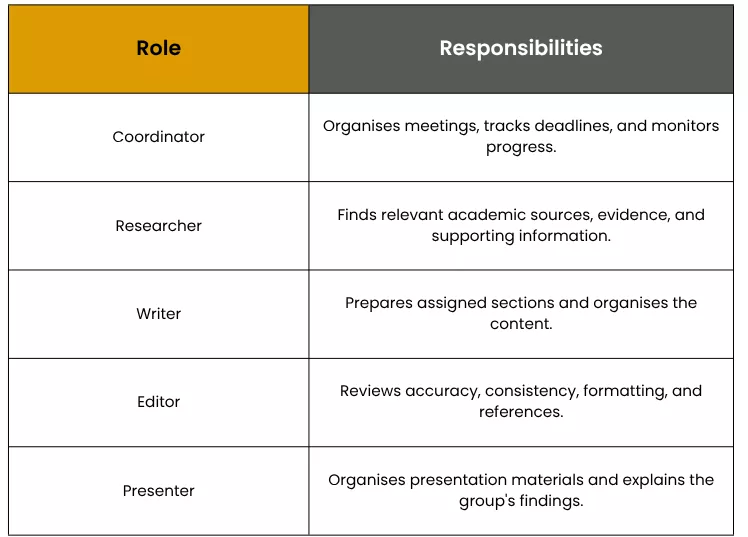
These roles can overlap depending on the group’s size. For example, a smaller team may have one student handle both research and writing. However, everyone should understand their assigned responsibilities before work begins.
How Do You Divide Work in an Online Group Project?
Distribute your workload depending on how complicated the assignment is, what needs to be done, and when. The number of tasks per person may differ, but the overall effort should be roughly equal.
Follow these steps:
1. Break it down – Split your assignment into different parts, e.g., researching, analyzing, writing, and presentation.
2. Consider strengths – Give those who are confident in academic research the part that requires extensive research, and give confident speakers the presentation.
3. Give deadlines – Agree on who is responsible for each task and when it should be completed.
4. Assign shared tasks – Decide who will bring the parts together, proofread the work, check references, and check over the finished assignment.
A shared list of tasks helps prevent duplicated work, and everyone will know their individual roles. For more practical advice on assigning responsibilities and coordinating tasks, explore this university guide on how to manage online group work.
What Are the Best Group Project Tips for Online Classes?
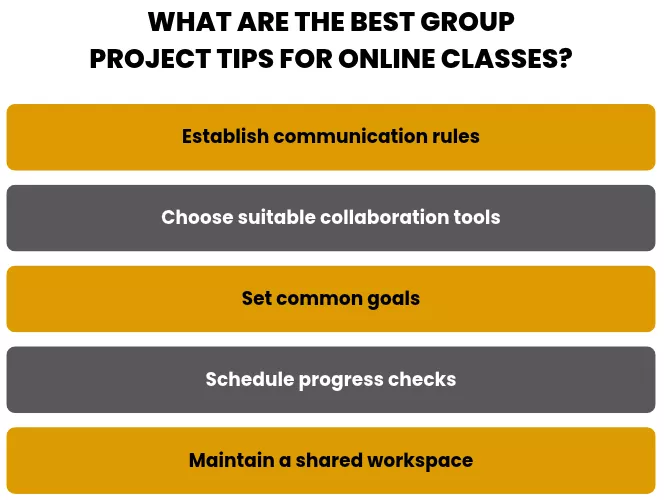
The most effective group project tips for online classes focus on communication, organization, and accountability. Following a few simple practices can help you avoid common issues.
Establish communication rules: Decide where you are going to communicate and how quickly you want responses.
Choose suitable collaboration tools: Use Microsoft Word (saved to OneDrive) to work together and Zoom or Microsoft Teams for meetings.
Set common goals: Make sure everyone understands the expected outcome and assessment criteria.
Schedule progress checks: Review completed tasks at agreed intervals instead of waiting until the deadline.
Maintain a shared workspace: Keep your research, drafts, citations, and presentation in an easy-to-access place.
Keeping well-organized notes is essential while collecting research and sharing ideas; you can explore the best ways to take notes to make information easier to review. Implementing these practices makes online group work more structured and reduces the chances of last-minute confusion.
How Can You Manage Time for Online Group Projects?
Effective time management for online group projects starts with setting a proper timeline for completing tasks within the given deadline. Work back from the final deadline and set internal deadlines for each stage, such as research, writing, and editing. This will help your group complete it efficiently.
Try to stay focused while completing your own task. Following these tips on how to focus on homework can help you minimize distractions.
For example, if a project is due in two weeks, the group could allocate:
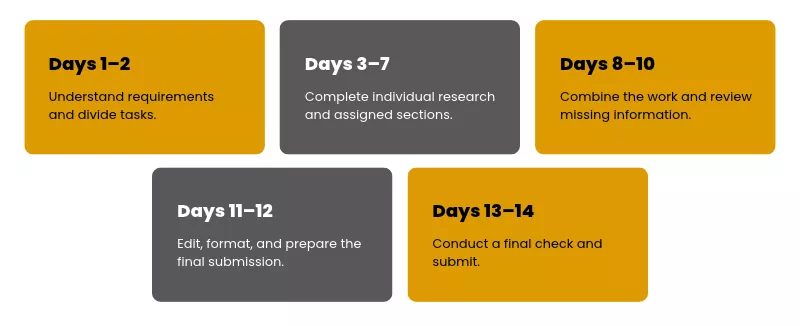
The timeline can be adjusted. However, adding some extra time before the deadline will give everyone time to deal with any unexpected issues that may occur.
Can Group Projects Work in Asynchronous Online Classes?
Yes. Students can complete group projects successfully in asynchronous classes if they communicate clearly and keep track of their progress.
Students will not need to meet at the same time. They can use shared documents, discussion boards, recordings, and project management tools.
For instance, one person can upload their research while another can comment on it later. The third person could complete their section using this research.
To make asynchronous group projects run smoothly, it is best to agree on how quickly you will reply to messages. Regularly update your shared project tracker and note any major changes. This means everyone can work on the project in their own time without causing delays.
Your school’s learning management system (LMS) also affects how students access course materials and communicate with their groups. Compare Moodle vs Canvas LMS to understand the differences between these platforms.
How Can I Keep Track of Everyone’s Work in an Online Group Project?
Use a common task tracker to help you track pending tasks, due dates, and completed work. This will make it easier to identify if there are any delays.
Tools such as Trello, Asana, and shared spreadsheets can help you organize your tasks. Create columns for tasks that members need to complete, are currently working on, need to review, and have finished.
Each task should include:
- The responsible group member.
- A clear description of the expected work.
- An agreed completion date.
- Its current progress status.
Set up short check-ins to discuss what needs to be done. However, don’t rely on verbal updates alone; record progress in the tracker to check it easily.
How Can I Document My Contribution If My Group Is Graded Together?
If your group receives a shared grade, it is still a good idea to keep a log of your personal contributions.
You can document your work by:
- Saving any research notes, drafts, and sections.
- Keeping a history of changes made to your documents using Google Docs or Microsoft Word.
- Keeping any relevant communications and task allocations.
- Adding completed milestones to the group project tracker.
- Completing peer assessments provided by the instructor.
Having an organized log can help you explain your contributions if the instructor requires more information.
What Happens When One Student Does Most of the Work in an Online Group Project?

When one person does most of the work, the workload becomes unbalanced, and other members may not contribute fully. This can also impact the quality of the work, as fewer people are reviewing it.
How you are graded will depend on how your instructor grades. Some courses will give everyone the same grade, while others will take into account the individual contributions by using peer reviews, participation, or individual assessments.
If you notice that some members are doing more work than others, raise the issue before the deadline. Explain which tasks remain incomplete and ask the group to redistribute the work fairly. If the problem persists, raise your concerns with your instructor.
How Should I Handle an Unfair Workload in an Online Group Assignment?

You should address any unfair workload issues as soon as possible. This will allow you to be clear about the issues you are facing and will help you decide how to redistribute the work fairly.
Talk about how the tasks have been distributed and how this compares with the work each person has actually completed. Explain what tasks are proving difficult to manage and how they can be redistributed fairly.
For example, if one team member has done most of the research, then another team member could take on organizing the references, proofreading, or creating presentation material.
If your individual coursework is becoming hard to balance with group responsibilities, you can get professional do my online homework for me services.
Make sure the new task allocation and deadlines are written down. If your team members are unwilling to work together or the unfair distribution continues, then ensure that you talk to your instructor to clearly explain the situation. You should provide evidence to back up your claims.
What Should I Do If My Online Group Members Stop Responding?

If group members stop replying, work through these steps before escalating:
1. Send a friendly message reminding them about what they need to do.
2. Try contacting them via another agreed method, such as email or a discussion board.
3. Give them a realistic time frame within which to respond, taking into account the project timeline.
4. Keep a record of who hasn’t replied and what isn’t completed.
5. Inform your instructor if it is affecting your submission deadline.
Don’t jump in and take over everyone’s roles without informing your instructor. Contacting your instructor early gives the team a better chance to work through the issue fairly.
Students managing multiple overlapping academic responsibilities can opt for do my online class services to get expert support and keep up with their coursework.
How Are Group Projects Graded in Online Classes?
Group projects in online classes may receive a shared grade, individual grades, or a combination of both, depending on your instructor and the grading rubric. Check the rubric to see whether individual contributions count toward the final grade, so you know what you are responsible for.
Common grading methods include:
- Group assessment: A group-based grading system where everyone gets the same grade.
- Individual assessment: An individual grading system where students get a grade based on their section of work.
- Peer evaluation: Peer grading where group members grade each other based on their contribution and reliability.
- Combined assessment: A mix of the above where the instructor will take into account the final project but also individual contributions/presentations.
If you feel overwhelmed managing assignments with exam preparation, you may need someone to take online exams.
What Should You Check Before Submitting an Online Group Project?
Before submitting your assignment, make sure you have completed everything requested by your instructor. Make sure all sections are combined into a single piece of work.
Use this final checklist:
- Have all parts of the assignment been addressed?
- Is the research accurate and well-supported?
- Are the citations and references correct?
- Have all sections been written in a consistent style and tone?
- Have you included your presentation, attachments, and supporting documents?
- Has someone checked the formatting, and is it ready before the deadline?
Only assign 1 or 2 people to do the final check; however, everyone can check the parts they have contributed. This will help to reduce avoidable mistakes and incomplete assignments. Students who need additional help managing demanding coursework and assignments can explore Buy Online Class services for academic support.
Conclusion: Handle Online Group Projects With Better Planning and Support
Successfully working on group projects online requires students to have clear roles, realistic deadlines, regular communication, and fair ways to measure each individual’s contribution.
If any issues arise, these should be dealt with as soon as possible. Keeping records of your work will help. If you require further support with difficult work, research, or assignments, BuyOnlineClass can provide you with academic support options to help you manage your coursework.
Contact us to find out what support is available for your online learning.
Frequently Asked Questions
Are online group projects harder than in-person group projects?
Group assignments can be more difficult to complete online as there is less opportunity for informal discussion. However, collaborative documents, clear deadlines, and consistent communication can help keep group work manageable. Working online also gives students more flexibility in when and where they contribute.
What tools are best for online group work?
Using tools such as Google Docs and Microsoft Word can help with collaborative writing, while Trello and Asana can be used for planning tasks and deadlines. Zoom and Microsoft Teams can be used for online meetings. The tools that are best will depend on the requirements of the task and what is available via your institution.
What should you do if you disagree with your team’s final project?
Speak to your group about your concerns. Refer back to the task details and grading criteria. Be specific with your requirements and suggest changes that can be made. If the group cannot agree, speak to your instructor.
How do you handle an unresponsive group member in an online class?
Contact the member through the communication platform your group agreed on. Give them a reasonable amount of time to respond, and if they still aren’t responding, then note down any tasks they haven’t done and contact your instructor.
How do online students work across different time zones?
Set flexible deadlines. Set up asynchronous communication. Create a shared document to keep everyone updated on the project. Agree on a meeting time that works for everyone for the most important updates, and don’t make every meeting mandatory.
How do you divide work fairly in an online group project?
Divide the assignment into smaller tasks. Consider everyone’s skill set, availability, and workload. Ensure everyone knows exactly what they need to do by assigning specific tasks with deadlines.
What can you do if your group members miss their deadlines?
Contact the group members who aren’t meeting the deadlines and ask them when they will be able to complete their tasks. Adjust task deadlines where possible. Share urgent tasks fairly between everyone. Contact your instructor if the delay will affect your final submission.
How can you prove your contribution to an online group assignment?
Save all your research, drafts, completed sections, task allocations, and messages. Use the shared document’s version history as evidence of your edits.
Related Posts
How to Identify Fake Academic Services: 6 Red Flags No One Talks About

How to Improve Performance in Online Classes: Tips for College Students

Full Semester Support vs Assignment Support: Choosing the Right Help

Want To See My Profile — Check Now
- Online Group Projects: How to Manage Teamwork and Assignments in an Online Class - November 9, 2026
- Common Mistakes to Avoid in Canvas: A Student Guide - November 4, 2026
- How to Focus on Homework: 5 Steps and Tips to Improve Your Focus - July 16, 2026

 ABOUT BUYONLINECLASS
 7,500+
 5621+